I decided to add in a main menu and how to play screen. I think this will help bring the game together and make it feel like more of a complete package. An article by Avard (2020) explains the importance of a main menu and needs to create a good first impression. I also thought a how to play section would be a good idea in case it’s not obvious how the controls are setup. For instance, if the player left clicks to the left of the character, they will attack on that side and if they left click on the right of the player, they will attack in that direction.
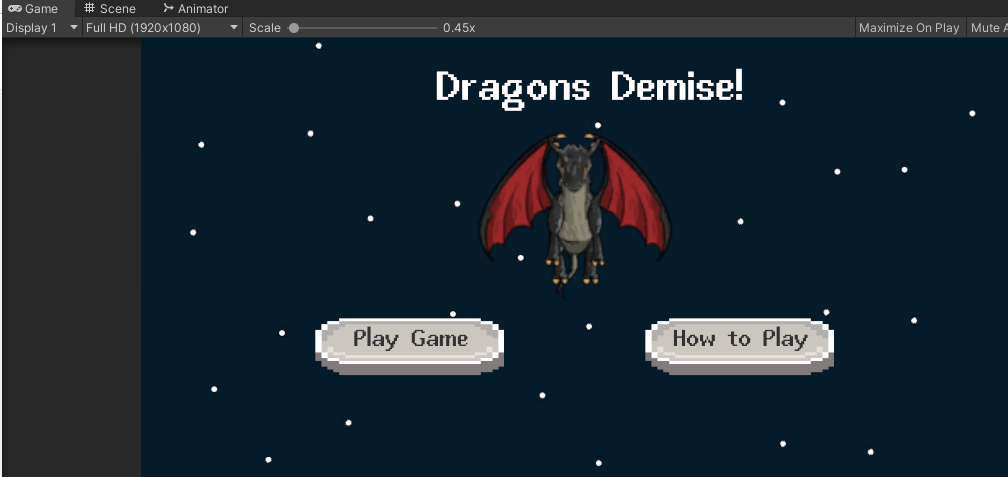
I came across a strange problem in the menu. I tried to import the Dragon sprite as I thought it would be a good idea to have the Dragon flying on the menu. However, they are tiny on the scene view (Fig 1) but normal sized when playing the game (Fig 2). In the end I thought it doesn’t really matter, as long as it looks normal in the game as there are higher priorities. Kaitila (2012) says in her book that as long as it works, it doesn’t matter. At the end of the day it’s only a 2 week sprint, it doesn’t have to be perfect. I may come back to this if I have time or if not I may come back after the jam as I’d like to know what the problem is in case I come across it in future.
I also created some more UI elements for player and dragons health. I did this using a slider and made the player and dragon max health equal to the max of the slider and made it equal to the current health after that. This shows a good indication of how the player is doing in the fight which I think is very important. There are other clever ways to display health for example, make the screen go darker the less health the player has but as this is a simple game I decided to keep it simple.
I also added a game over screen, which displays certain text if you kill the dragon or die. One of my goals by the end of the course is to make my own game with a good story so I decided to add in certain things which hints that maybe killing the dragon is actually a bad thing. In my head there’s a bit of a backstory where humans have killed all the dragons, they started the way and the dragons have just been defending themselves. The dragon in the game is the last dragon. Where the player’s health is it shows “Hero’s” health, it’s in quote marks hinting that they are not the hero. I also decided to show text when the user kills the dragon saying “I hope you’re proud of yourself” and playing some sad music. Looking back I could have added more into the story, such as a menu with text on the background of the game. I feel that if I organised my time better I could have had time to do this.
Organisation was key with this game, unfortunately, I didn’t complete everything I wanted to. I decided to make the minimal viable product and once I had done that I didn’t have much time for anything else. The dragon was the most important part of the game so that took priority over adding in more enemies. The dragon moves from side to side, the idea is the player jumps over the dragon and attacks before it moves again. I would have liked to use fire but again, I ran out of time. I think if I planned out my time more effectively I would have had time to add these in. I did create a trello board but I didn’t really look at it until I had finished the game. This is something to learn from and take forward into future projects.
Quite a big thing I need to work on is my confidence. I almost didn’t apply for the course because of my low confidence but I pushed myself to do it and now I have made a small game with a boss battle. It may only be small and not have too many features but I am proud of it. It’s a starting point which I can build from and hopefully improve with future games. I am also still going through Udemy course to learn and practice more with it, which I will probably work on during the reading week.
Learning more C# is another one of my goals as I want to get a job in the industry as a developer. I want to create a good portfolio with fun games and code examples. This game jam was a good step towards that goal. I learned how to make a cutscene. I’m sure there are different/better ways than what I did and I do plan to explore that. Something I need to further research is the preferred code practice. I don’t think this matters too much if I’m working on my own but I plan on getting a job in the industry so I’d like to use best practice. Perhaps this is something I will work on more in the next jam or dedicate a future journal post for it. I think it’s important to understand this before working in a group which is why I think I’ll work on the next jam on my own as well.
I am terrible at presentations, but I decided to show off my game in the meeting to get some practice at doing this. It was a bit awkward as the game was on my other screen, so I wasn’t facing the camera while showcasing it. I was also struggling to hear over the games music so in future I need to lower the volume. I’m not sure if anyone else could hear it either. My mouse also starting sticking so I couldn’t kill the dragon first time making the presentation longer. I wanted to show the specific text and music you get from killing the dragon. The process of presenting this has taught me a lesson to be more prepared in the future. If I had prepared what I was going to say beforehand, perhaps it would have gone better. Whilst watching the others present their prototypes before me I realised how unprepared I was. My plan was just to show myself playing the game and explain what I did and why so I got my mind map and trello board up as well to explain those too.
I did have a lot of things I wanted to say but when it started my mind went blank and I got nervous so found it hard to speak. I’ve never been great at presentations anyway so hopefully I can improve on this, I hope everyone enjoyed it anyway. Giovani also said that I need a more specific goal, so I need to put some thought into exactly what I want to get out of this course. I said my goal was to get a job in the game industry but I think what I actually want to do is create my game, with a good story. I’ve had a few ideas but nothing has come together yet. In one of my previous posts I mentioned that listening to music helps my creative process so I will make sure to do this to help. Another strange thing I get ideas from is my dreams, sometimes I feel I’m watching some kind of Hollywood film in my dreams so I need to write these down as soon as possible as I tend to forget them. Poetry (2019), gives instructions on how to remember them, basically I just need to keep writing them down and eventually they will be easier to recall. I will make sure to keep a notepad by my bed.
Here is a link to my game, I know it’s short but I hope you enjoy it: https://riggy92.itch.io/dragons-demise
Fig 1
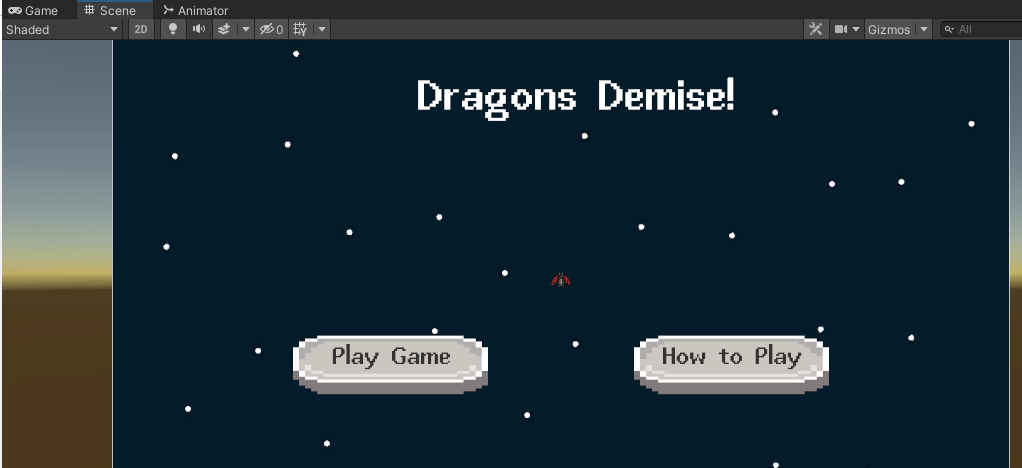
Fig 2
References
Avard, A., 2020. The hidden value of video game main menus, and the design secrets that compel you to hit play. [online] gamesradar. Available at: <https://www.gamesradar.com/the-hidden-value-of-video-game-main-menus-and-the-design-secrets-that-compel-you-to-hit-play/> [Accessed 23 October 2021].
Kaitila, C., 2012. The Game Jam survival guide. Birmingham: Packt Publishing Ltd, pp.63-64.
Poetry, S., 2019. How to Use Your Dreams for Ideas. [online] Medium. Available at: <https://medium.com/live-your-life-on-purpose/how-to-use-your-dreams-for-ideas-ff2c8a16eefb> [Accessed 23 October 2021].
 Richard Charles Ellis