Going into the meeting I couldn’t help but feel nervous about the theme and the whole process. I haven’t taken part in a game jam or anything like that before, I’m more used to casually practising without a deadline. Having a deadline of 2 weeks worries me. What if I don’t finish anything or it’s only half made? What if I can’t think of anything?
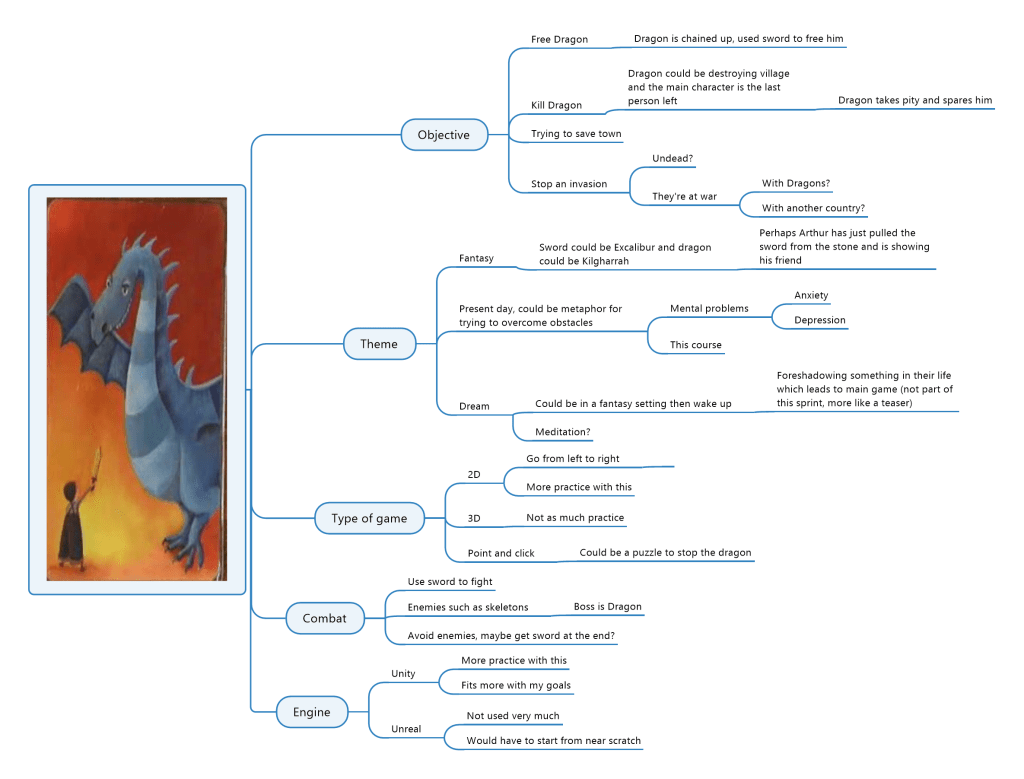
I felt better after getting the theme and receiving the advice from Giovani and Gareth. When the theme was revealed I felt relief, it showed a person holding a sword up to the dragon and the ideas came flooding in. My first idea was to have the dragon ask the user questions and if the user got them wrong they were killed but Cooke (2021) explains perhaps it’s not the best thing to go with your first idea. I therefore decided to create a mind map of potential ideas.
I decided to base my ideas off the Dixit card and not a newspaper article as I already had a few ideas and they were only intended as a catalyst for our ideas. I used the image of the Dixit card on the mind map and had each branch coming off. I enjoyed the process which emphasised how useful a mind map is. I got all the ideas I had initially down on paper and I could look through them and decide which branches I wanted to take for the game. There was a study by Al-Jarf (2009) that concluded that mind maps help with creative thinking and help to visualise and organise ideas which is the exact reason I have used it.
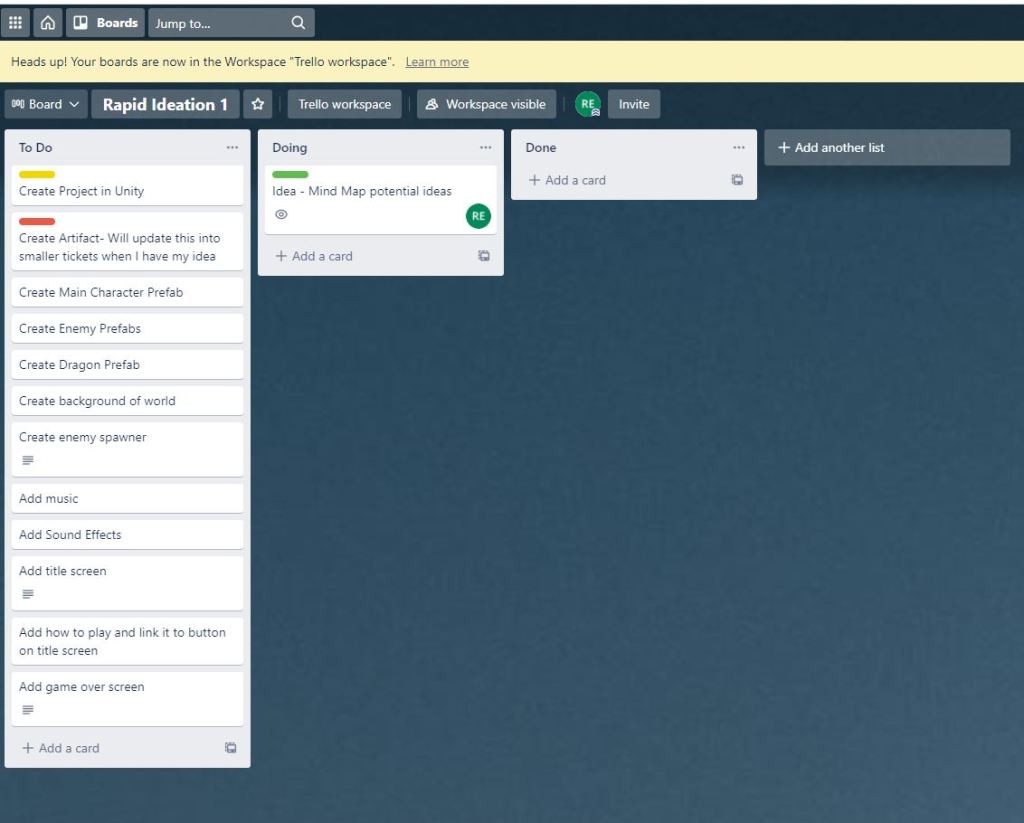
I am currently working full time (7:30am – 6pm) Monday to Friday so organisation is key. I decided to make a trello board of tasks. This will help break down what I need to do and help me see the overall vision for the game. Drake (2018) wrote a review for Trello and says it’s easy to use and free which is ideal. I also have a lot of experience using this at work so I already know how it works. I added a few tickets to the trello board which has given me a good overview. Naik and Jenkins (2019) researched the effectiveness of using a Trello board for creating games as part of a competition with undergraduate courses. The researched showed that grades went up by 11% which shows how effective this can be so I will make sure to carry on using this in the future.
The first thing I decided to do, after creating the project in Unity was to get the main character. I don’t know how to make Sprites, I’m not much of an artist and haven’t tried this before so given the timescales I decided to use some Sprites I had already purchased. This is something I’d like to go back to in future to make my games more unique but for now I want to focus more on the programming side as that is what I want to develop and is part of my career goals of getting a job in the industry as a game developer. I did find it quite difficult to pick sprites as I had to make sure they fit together and the look of the game made sense.
The sprites came in one sheet, I’m use to using sprite editor to cut each sprite out into their own entity. I then added animations for the player and dragon. It was just a case of dragging the sprites into the animation and choosing how fast it should be. I also used animator to create boolean parameters which will be used in code to determine when each animation should be used.
For the background I decided to use a night sky with stars to set the fight at night and the ground is grass. The player will move from left to right to then fight the dragon at the end. I wanted to keep it simple due to the short time scale, especially around my work and other commitments. Kaitila (2012) says for game jams it should be kept simple, as long as it works it doesn’t matter if the code isn’t perfect or the concept is simple.
I did however decide to do one complex thing (for me anyway) which is setup a cutscene. I have never done this before but I thought it would work really well with the game. When the player gets to a certain point, they are forced to walk up to the Dragon. They exchange words like “I will kill you”, I might change this later but it’s a placeholder for now. After the text has finished the dragon will then start to move from left to right, pause, and then right to left. The player also gains control of the character again. Basically the “cutscene” sets up the boss fight. The player then jumps over the dragon and attacks. I have mostly got this working at this point but the player doesn’t take damage at the moment, they can, however, kill the dragon. This is a very important step in my Development. As I have mentioned I want to create my own story based game and knowing how to get a cutscene to work is another step towards acquiring the knowledge for this goal.
I’m going to create a separate blog post for the 2nd week of the game so to be continued.
Mind Map
Trello Board
References
Al-Jarf, R., 2009. Enhancing Freshman Students’ Writing Skills With a Mind-Mapping Software. SSRN Electronic Journal,.
Cooke, M., 2021. Tips for effective jamming. [online] Learn.falmouth.ac.uk. Available at: <https://learn.falmouth.ac.uk/courses/240/pages/week-4-on-jams-and-hackathons?module_item_id=9159> [Accessed 16 October 2021].
Drake, N., 2018. Trello review. [online] TechRadar. Available at: <https://www.techradar.com/uk/reviews/trello> [Accessed 16 October 2021].
Kaitila, C., 2012. The Game Jam survival guide. Birmingham: Packt Publishing Ltd, pp.63-64.
Naik, N. and Jenkins, P., 2019. Relax, It’s a Game: Utilising Gamification in Learning Agile Scrum
Software Development. 2019 IEEE Conference on Games (CoG),.
 Richard Charles Ellis